ARTICLE
BIM Modeling Software for AEC: A Practical Overview
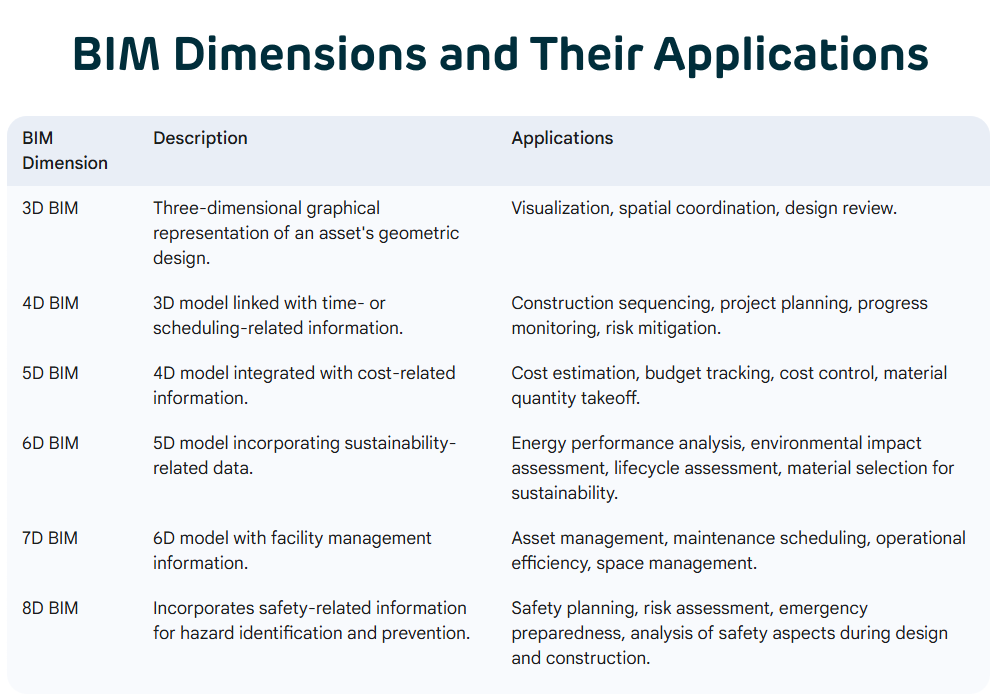
BIM software is not one product category; it is several, doing different jobs — authoring geometry, coordinating disciplines, modeling civil infrastructure, and holding the standards that let all of it exchange data. This is what each category actually does, and what is worth checking before choosing a tool for a specific package.

What BIM software actually needs to do
Building information modeling software is often described as if it were one thing, but the label covers several different jobs done by different tools. At the core is object-based, parametric modeling: geometry is built once as a set of objects — a wall, a beam, a duct run — that carry data along with their shape, so a schedule, a quantity take-off and a drawing view can all be generated from the same model instead of maintained separately. Change the object once and everything derived from it updates with it.
Beyond that core, the category splits by function: authoring tools build the geometry itself, coordination tools bring multiple disciplines' models together and check them against each other, and analysis tools test a design against a specific requirement — structural, energy, cost, schedule. A real project usually uses several of these in the same package, not one tool doing everything, which is why understanding the category split matters more than picking a single favorite product. Knowing which job a tool is actually doing also makes it easier to spot when a package is missing a step — a model with no coordination check ever run against it, for instance, rather than a genuine, verified BIM deliverable.
Authoring platforms: modeling the building itself
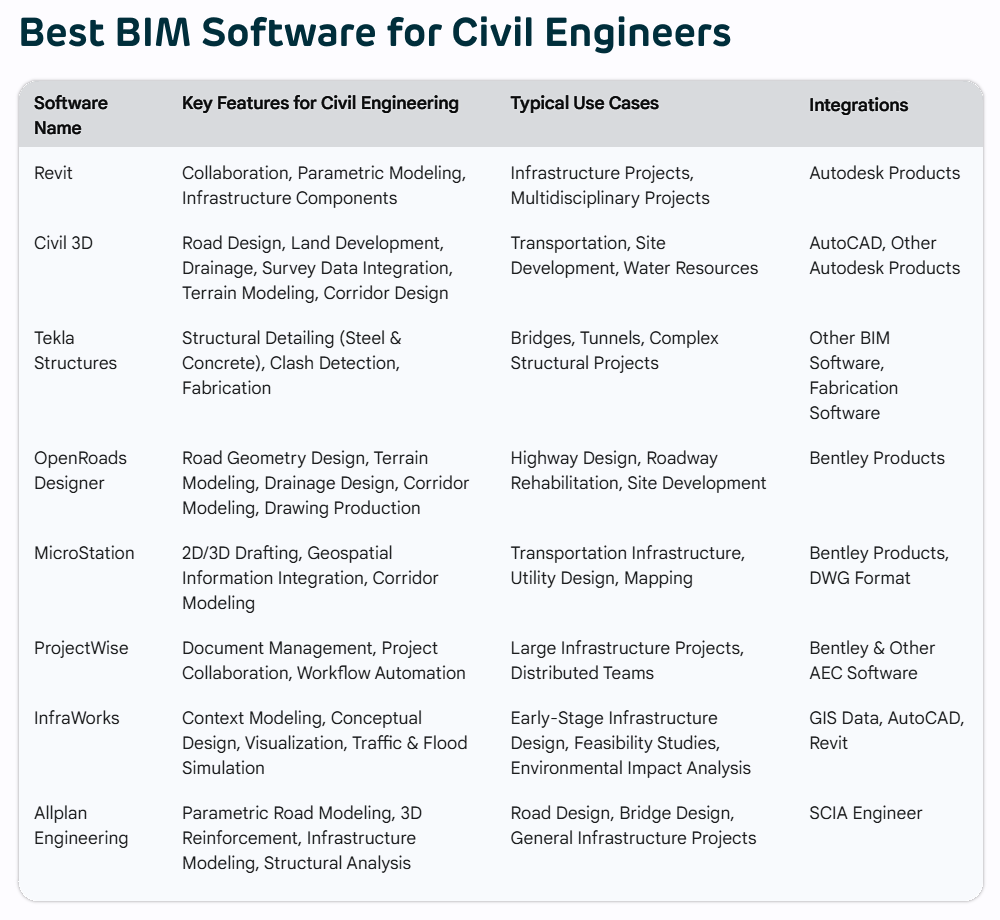
Authoring tools are where the geometry gets built. Autodesk Revit is the most widely used general BIM authoring platform across architecture, structure and MEP, with a large family-based content library and broad interoperability with downstream coordination tools. Graphisoft ArchiCAD serves a similar role with a strong architectural focus and a long history of native IFC support. Vectorworks and SketchUp are commonly used earlier in design, for massing and concept work, with SketchUp in particular valued for how quickly a rough model can be produced and shared.
For steel and precast detailing specifically, Tekla Structures is the platform most detailing teams standardize their model production on: it models connections and reinforcement at a level of detail general-purpose BIM tools are not built for, and its output is what most fabrication shops expect to receive. AutoCAD remains in wide use for 2D production and for geometry that does not need a fully object-based model. None of these tools compete on every job — the right authoring platform depends on the discipline and the level of detail the deliverable actually requires.
Coordination and clash-detection tools
Coordination tools exist to bring separately-authored models together and check them against each other, which is a different job from authoring and usually a different piece of software. Navisworks is the tool most commonly used to aggregate federated models from Revit, Tekla and other authoring platforms and run clash detection across them — both hard clashes, where two elements physically occupy the same space, and clearance clashes, where elements are too close for the access or tolerance a trade actually needs.
Cloud-based coordination platforms such as Trimble Connect extend the same idea to distributed teams: models are published to a shared environment, issues are logged against specific model elements rather than described in an email, and each discipline can see what changed since they last checked. What matters from any of these tools is not the clash count on its own — it is whether every logged clash has a tracked resolution, because an unresolved list is not meaningfully different from no coordination check at all.
Civil and infrastructure modeling
Civil infrastructure has different geometry problems from buildings — long, mostly linear alignments, terrain that has to be surveyed and modeled accurately, and design elements defined by corridors and cross-sections rather than discrete objects — and the software built for it reflects that. Autodesk Civil 3D links alignments, profiles and cross-sections so that changing a road or rail alignment updates every dependent section automatically, similar in principle to how a building model propagates a change but applied to corridor geometry instead of rooms.
Bentley's civil tools, including OpenRoads Designer and MicroStation, are widely used on infrastructure and transportation projects, particularly where a project already sits inside a Bentley-based common data environment. As with building authoring platforms, the practical choice usually comes down to what the rest of the project team, and the client's data environment, already standardizes on, rather than a feature-by-feature comparison done in isolation.
The standards that let any of this exchange data
None of the tools above are useful in isolation on a multi-discipline project, and what actually makes coordination possible is a small set of open standards that most authoring and coordination platforms support. IFC (Industry Foundation Classes, ISO 16739) is the open format that lets a model built in one platform be opened, checked and coordinated against in another, rather than locking a project into a single platform's proprietary format. BCF (BIM Collaboration Format) carries issues and viewpoints between platforms, so a clash flagged in a coordination tool can be sent to and actioned in the authoring tool that owns that element.
ISO 19650 governs the information management process around all of this — naming conventions, the common data environment structure, who owns which model, and how information is exchanged through a project's stages. A software choice that ignores these standards can still produce a good model, but it makes every downstream exchange manual, and manual exchange is exactly where version confusion and rework start.
Choosing software for a specific package
The right tool for a package is rarely a matter of picking the objectively best product; it is matching software to what the deliverable actually requires and what the rest of the project already runs on. A few questions settle most of the decision: what does the client's common data environment and information requirements actually specify, if anything; what format does the deliverable have to be issued in, and does the authoring platform produce it natively or only through a conversion step; and what does the rest of the design team already use, since a coordination benefit disappears quickly if every discipline is on an incompatible platform.
Software capability matters less than most teams assume, and process discipline matters more: a good coordination outcome comes from consistent modeling standards, a real issue-tracking habit and IFC or BCF exchange that is actually checked, not from which authoring platform's logo is on the license. The tool should follow the deliverable and the team, not the other way around. When a package underperforms, the software is rarely the actual cause; a missing standard, an unrun check or an untracked issue almost always is.